Craft Order Business Planner Bundle: A Practical Resource for Product-Based Entrepreneurs
For anyone running a small business that involves custom‑made products—whether it’s tumblers, T‑shirts, wine glasses, ornaments, or wooden signs—staying organized is often the hardest part of the work. You might be taking orders through social media, market stalls, or a simple website, and very quickly the volume of requests, payments, and deadlines can become overwhelming. That is where a specialized set of planning tools can help. The Craft Order Business Planner Bundle brings together a collection of forms, trackers, and goal sheets built specifically for the kind of order‑by‑order workflow that product sellers face every day.
What Makes the Craft Order Business Planner Bundle Distinct?
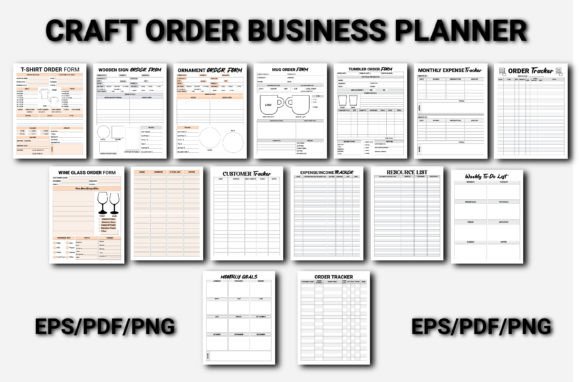
Unlike generic daily planners or all‑purpose project management tools, this bundle is designed around the specific repeatable tasks of a product‑based craft business. It includes dedicated order forms for different product lines: T‑Shirt Order Form, Mug Order Form, Ornament Order Form, Tumbler Order Form, Wine Glass Order Form, and Wooden Sign Order Book. Each of these forms can be printed out or used digitally to capture customer details, product selections, sizing, personalization notes, and payment status.
In addition to order forms, the bundle contains tracking and financial management sheets: Customer Tracker, Expense & Income Tracker, Monthly Expense Tracker, and Order Tracker (appears twice in the list, likely a dedicated order log and a separate overview sheet). There is also a Monthly Goals page and a Weekly To‑Do List to help you structure your time, plus a Resource List for keeping track of suppliers, material sources, or favorite design tools.
The distinction here is depth of specificity. A single order form that tries to work for every product usually ends up being too generic—you end up writing in the margins, skipping sections, or adapting it on the fly. Having separate forms for each product category means you can capture the exact details that matter for that item, without clutter. For example, a T‑shirt order form needs size, color, and quantity, while a wine glass order form might need a font choice or personalization text. The bundle handles those differences explicitly.
How It Compares with Alternative Approaches
When evaluating whether the Craft Order Business Planner Bundle fits your workflow, it helps to consider the main alternatives that people in similar businesses use.
Spreadsheets and Custom Templates
Many sellers start with a spreadsheet—Google Sheets or Excel—to log orders. Spreadsheets are flexible, free, and can be customized to your exact needs. The tradeoff is that they require setup time. You have to design the columns, decide on formulas for expenses and income, and ensure you are not accidentally overwriting data. For someone who is comfortable with spreadsheets, this can be a powerful option. However, if you prefer a ready‑to‑use structure that you can print or fill immediately, the bundled forms remove that upfront work. The Monthly Expense Tracker and ExpenseIncome Tracker in the bundle already have the categories you need for a typical craft business, so you can start tracking right away without building anything.
All‑in‑One Business Planners
General business planners (often sold on Amazon or in office supply stores) include sections for orders, but they are usually designed for service‑based or retail businesses with fewer product variations. They may have one order page that expects a SKU number and a quantity, with no room for personalization notes or color‑way selections. If you sell custom‑engraved ornaments that can have multiple color combinations and text lines, a standard planner page will feel cramped. The Craft Order Business Planner Bundle addresses this by offering separate forms that allocate space for the details that only apply to certain products. For instance, the Wooden Sign Order Book likely includes fields for sign dimensions, stain color, and lettering style—details you would not find in a generic order log.
Digital Project Management Tools
Platforms like Trello, Asana, or Notion are popular for task tracking. They work well if you prefer working on a screen and need to collaborate with team members. The limitation is that they are not inherently designed for order‑specific data entry. You end up creating a database or using custom fields, and the learning curve can be steep for someone who just wants to write down an order and move on. The bundle’s paper‑friendly format (or simple digital fillable format) offers a lower‑friction experience for solo entrepreneurs who want to capture information quickly, especially at a market or craft fair where a laptop or app might be inconvenient.
Strengths and Best‑Fit Situations
The Craft Order Business Planner Bundle works best in specific scenarios.
- Multi‑product businesses: If you sell a range of items—like T‑shirts, tumblers, and ornaments—the dedicated forms help you keep each product line organized without cross‑contamination of data. You can pull out the relevant form depending on what the customer is ordering.
- High‑volume custom orders: When you take many personalized orders, the risk of mixing up details increases. Having a structured form for each product reduces errors because you fill in the exact fields that the product requires.
- Financial tracking for small operations: The combination of a Customer Tracker, ExpenseIncome Tracker, and Monthly Expense Tracker gives you a simple bookkeeping system without needing accounting software. For a solo maker who wants to see their monthly spending on supplies and their income from orders, this bundle provides a clear picture.
- Goal setting and task management: The Monthly Goals and Weekly To‑Do List are not just generic fillers. They are placed in the same binder as your order forms, so you can plan your production schedule around your goals. For example, if your goal is to complete 20 ornament orders by mid‑December, you can use the Weekly To‑Do List to break down the steps.
Tradeoffs and Limitations
No resource is perfect for everyone. Understanding the limitations of the Craft Order Business Planner Bundle will help you decide if it is the right fit or if you need to supplement it with other tools.
Paper versus digital: The bundle appears to be designed primarily as a printable PDF or a physical product. If you are completely digital and want automated calculations, invoice generation, or cloud backup, you will still need a spreadsheet or accounting app. The trackers in this bundle require manual entry and manual tallying. That said, some sellers find manually writing numbers helpful for staying engaged with their finances rather than letting a spreadsheet do everything invisibly.
Duplicate order tracker: The bundle includes two items labeled “Order Tracker.” Without seeing the actual pages, it is unclear whether they are two versions (maybe one for pending orders and one for completed) or a repetition. In either case, you may need to assess if you want two similar sheets or if you would prefer one consolidated log. You can always print only the ones you need.
No inventory management: The bundle does not include an inventory count sheet or a material usage log. If you need to track how many blanks (like mugs or shirts) you have in stock, you may want to add a separate inventory sheet. The Resource List can be used for supplier contact info, but it does not replace a running stock count.
Learning curve for structure: Some users prefer a fully open layout where they can draw or write in any format. The forms in this bundle provide labeled fields, which can feel restrictive if your products have unusual variations. For example, if you sell T‑shirts with a front and back print that require separate design descriptions, you will need to adapt the T‑Shirt Order Form or add sticky notes.
When This Bundle May Be the Right Choice
You will likely benefit from the Craft Order Business Planner Bundle if:
- You currently use a notebook or a stack of loose paper and want a more organized system without starting from scratch.
- You sell at craft fairs, pop‑up markets, or in‑person where you need to write orders quickly on paper.
- You have multiple product lines and want separate forms for each to avoid confusion.
- You want to track expenses and income in a simple way without learning accounting software.
- You like to pair goal setting with daily/weekly task planning in the same physical binder as your orders.
When You Might Need a Different Approach
Consider other options if:
- You run a high‑volume online store that generates dozens of orders per day, where manual entry would be too slow. In that case, an e‑commerce platform with automated order management would be essential.
- You need detailed inventory tracking with reorder alerts. The bundle does not cover that, so you would want a separate inventory system.
- You prefer to work entirely on your phone or tablet with cloud‑synced data. While you could use the bundle as a digital fillable PDF on a tablet, the forms are not designed as an app with autofill or search functions.
- You need professional invoicing or tax reports. The expense and income trackers give you the numbers, but you would still need to transfer them into an invoice template or tax preparation software.
How to Make the Most of This Bundle
If you decide the Craft Order Business Planner Bundle aligns with your workflow, a few practical tips can help you get the best results.
Use a dedicated binder with dividers. Separate the order forms by product type, and keep the financial trackers and goal sheets in a front section. This way you can flip to the right form without searching.
Combine the Weekly To‑Do List with the Monthly Goals page. At the start of each month, use the Monthly Goals sheet to write down your big targets—like promote a new mug design or finish 50 ornaments. Each week, break those down into specific tasks on the Weekly To‑Do List. This connects your daily work to your larger business objectives.
Use the Resource List for supplier notes. Write down the contact info, lead times, and minimum order quantities for each of your material suppliers. When you run low on blanks, you will have everything you need in one place.
Cross‑reference the Customer Tracker with Order Trackers. If a customer places multiple orders over time, the Customer Tracker lets you see their history, while the order forms capture individual transactions. This is especially useful for repeat buyers who request different products on different occasions.
Consider printing on durable paper. Since order forms may be handled at markets or in a busy workspace, printing them on cardstock or heavier paper can extend their life. Alternatively, use a plastic sheet protector for the financial trackers and update them with a dry‑erase marker.
Balancing Structure with Flexibility
The value of a bundle like this lies in its balance between structured forms and the freedom to use them in your own way. The forms are not rigid templates that force you to follow one method. You can decide to use the T‑shirt form only for custom orders and handle plain restock orders in a simple notebook. You can use the ExpenseIncome Tracker monthly or weekly. The important thing is that you are not starting from a blank page—you have a framework that covers the core needs of a product‑based craft business.
At the same time, no single bundle can anticipate every variation of every craft business. You might need to add a few blank pages for miscellaneous notes, or create a separate page for shipping addresses if you sell online. That is normal and expected. The bundle serves as a solid foundation that you can adapt over time.
Making an Informed Decision
Ultimately, choosing a planning system for your craft order business comes down to your work style. Do you prefer a ready‑to‑use, product‑specific structure that you can pick up and start writing in today? Or do you need a more flexible, digital, or inventory‑focused system that requires more setup? The Craft Order Business Planner Bundle is strongest for sellers who value clarity, separation of product lines, and a simple financial overview—all within a single physical or printable set.
If you are still exploring, consider trying the bundle for a month. Print out one of each form and use them for your next 10 or 20 orders. See whether the dedicated product forms reduce errors or speed up your order‑taking process. Pay attention to whether the expense trackers help you see patterns in your spending. And notice if having a Monthly Goals page actually keeps you focused on the bigger picture. The true test is whether the system makes your day‑to‑day work easier, not whether it looks organized on a shelf.
Thank you for visiting our portfolio. If you like our products feel free to subscribe to our profile, we are adding new products every few days.