Editable T-Shirt Business Planner Canva
Running a t-shirt business means juggling design ideas, supplier communications, inventory levels, and marketing campaigns all at once. One misstep in tracking costs or missing a shipping deadline can throw off your entire season. The Editable T-Shirt Business Planner Canva is a comprehensive, print-ready toolkit designed to bring order to that chaos. It gives you a single place to manage everything from startup costs and product evaluations to social media posting and annual profit tracking — all in a format you can customize and then upload directly to Amazon KDP.
This planner stands out because it doesn’t lock you into a rigid system. The editable Canva link lets you tweak each page to match your specific product line, pricing structure, or branding colors. Whether you are selling custom tees for local events, running a print-on-demand store, or building a wholesale apparel brand, having these organizational tools in one neat package saves hours of spreadsheet work every week.
What Makes This Planner Different
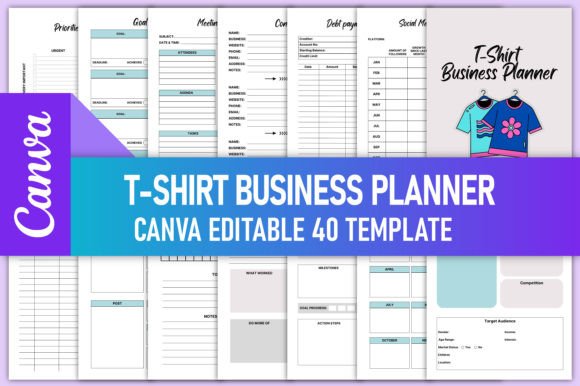
Many business planners on the market are either too generic for apparel startups or too focused on a single aspect like finance. This one hits a sweet spot by covering the full lifecycle of a t-shirt business while remaining fully customizable. The file package includes 40 pages at 8.5 x 11 inches with no bleed area, so you get clean, KDP-tested PDFs, PNGs, and JPGs that are ready to upload. The CMYK color profile ensures that if you print physical copies, the colors match what you see on screen.
The editable Canva link is the real game-changer. You can adjust page titles, add your logo, change column headers, or even remove sections that don’t apply to your workflow. If you primarily sell through Etsy instead of your own website, you can rename the social media planner to track Etsy traffic alongside Instagram and Facebook. That flexibility makes the planner useful whether you are a solopreneur working from a home office or a small team scaling up production.
Core Trackers That Keep You Organized
The planner includes a broad set of trackers that cover the essential areas of running a t-shirt business. Instead of manually creating tables or juggling multiple apps, you get dedicated pages for:
- T-Shirt Startup Costs and T-Shirt Order From sheets to log initial investments and supplier orders
- Product Inventory and Inventory Tracking pages to monitor stock levels and reorder points
- Sales Tracker and Income Tracker to record every transaction in one place
- Expense Tracker and Bill Payment Tracker to keep overheads under control
- Profit Tracker and Annual Profit Loss to see your bottom line at a glance
- Shipping Tracker to monitor delivery timelines and customer satisfaction
- Facebook Post Planner, Social Media Planner, and Social Media Statistics pages to plan and measure your content
Having this many trackers in one file means you never have to hunt for a piece of information. When you are reviewing quarterly performance, you can flip from the expense log to the profit tracker to the annual overview in seconds. That continuity helps you spot trends, like whether a particular design always sells best in spring, or if shipping costs are eating into margins on smaller orders.
Real-World Applications for Different Users
The versatility of this planner makes it useful across many scenarios. Here are a few examples of how different professionals might use it:
- Freelance designers launching their own apparel line can use the Product Evaluation and Seasonal Ideas pages to test which designs resonate before investing in bulk printing.
- Small business owners managing multiple product categories can rely on the Inventory Tracking and Monthly Budget pages to allocate resources wisely and avoid overstocking slow movers.
- Marketing professionals who handle content for a t-shirt brand can plan campaigns using the Facebook Post Planner and track performance with the Social Media Statistics log, all while keeping an eye on overall business health through the Monthly Review and Weekly Review pages.
- Educators and workshop facilitators teaching entrepreneurship can use the planner as a hands-on template for students to practice business planning without needing complex software.
- Bloggers and content creators selling merchandise can use the Goal Planner and Priorities Planner to align their content calendar with product launches and promotional periods.
Each page serves a practical purpose. The Monthly Planner and Weekly Planner allow you to schedule production runs alongside marketing pushes. The Daily Planner and Daily Review help you stay on top of daily fulfillment tasks without losing sight of bigger goals. And the Password Tracker is a small but thoughtful addition — anyone managing multiple supplier portals, print shop accounts, and social media logins knows how easy it is to lose a critical password.
How the KDP-Ready Format Saves Time
If you plan to sell this planner as a printed book or digital download on Amazon, the KDP-tested specifications remove a lot of guesswork. The files come in CMYK color at 300 DPI, which meets Amazon’s quality standards for interior pages. The 8.5 x 11 inch size with no bleed means you don’t have to mess with margin adjustments or worry about content getting cut off during printing. Simply upload the PDF or PNG files, and you are good to go.
The 40-page count strikes a balance between being comprehensive enough to cover all key business areas and compact enough to keep printing costs reasonable. Each page is designed with clean layouts and clear labels, so buyers can start using it immediately without a steep learning curve. If you are a content creator or publisher looking to expand your KDP catalog, this ready-to-upload package can save you days of formatting work.
Practical Benefits for Daily Operations
Using a structured planner like this one brings several benefits that go beyond simple organization:
- Consistency in tracking — When you always log expenses in the same format, comparing months becomes straightforward. The Expense Tracker and Income Tracker use consistent columns, so you can quickly spot where your money is going.
- Better decision-making — With the Annual Profit Loss and Profit Tracker pages, you can identify which product lines are most profitable and which are dragging down your margins.
- Time savings — Instead of building a new spreadsheet every time you need to track something, you have a dedicated page ready to fill out. The To do list and Meeting Notes pages also help you stay on top of daily tasks without extra setup.
- Improved accountability — The Goal Planner and Priorities Planner let you set measurable targets and review them during your Weekly Review and Monthly Review sessions. This rhythm keeps you honest about your progress.
The Contact List and Business Overview pages are also worth highlighting. When you are working with multiple suppliers, print shops, and freelance designers, having a single place for contact details and key business metrics prevents you from scrambling for information during busy periods. And the Debt Payment Tracker is a thoughtful inclusion for businesses that are working through startup loans or equipment financing — it helps you stay current on obligations while planning future investments.
Customization Tips for Maximum Value
To get the most out of the editable Canva link, consider a few practical adjustments before you finalize your planner. First, change the page titles to match your specific product categories. If you sell both t-shirts and hoodies, rename the inventory pages to reflect both. Second, add your brand colors and logo to the header or footer of each page. This gives the planner a professional look and reinforces your brand identity every time you use it. Third, review the trackers and remove any that don’t apply to your business. If you don’t use Facebook for marketing, swap that page for an extra Notes Ideas or Product Evaluation spread.
The Seasonal Ideas page is one you might want to expand. Print several copies or create additional pages in Canva to plan for different seasons. This proactive approach helps you stay ahead of design trends and order materials early, reducing the stress of last-minute production runs. Similarly, the Project Planner can be used for both one-time events, like a pop-up shop, and ongoing initiatives, like a new product line launch.
Why This Planner Works for Entrepreneurs and Content Creators
Adults aged 20 to 50 who are building brands or scaling creative businesses often struggle with the operational side of things. They might have great design instincts and a strong social media presence but lack a systematic way to track finances, inventory, and deadlines. This planner bridges that gap. It provides the structure of a traditional business ledger while staying flexible enough to accommodate the fast-paced, multi-channel nature of modern apparel sales.
For publishers and KDP sellers, the fact that it is already formatted for Amazon is a huge time saver. You can buy the Canva template, make your own edits, and upload it without spending hours on layout adjustments. For freelancers and hobbyists who sell t-shirts on the side, the low page count means you can print the entire planner at home or at a local print shop without breaking the bank. The mix of financial, marketing, and planning pages gives you a complete view of your business in a single binder or digital file.
The Thank You page at the end is a nice touch — whether you are including this planner in a client deliverable or using it personally, it adds a professional finishing note that leaves a positive impression.
Final Observations and Recommendations
The Editable T-Shirt Business Planner Canva is not just a collection of templates; it is a workflow tool that can adapt as your business grows. Start by using the Startup Costs and T-Shirt Order From pages to lay your foundation, then gradually incorporate the Sales Tracker, Inventory Tracking, and Social Media Planner as your operations expand. The Annual Overview and Annual Finance pages become more valuable once you have six to twelve months of data to review.
If you are evaluating this planner, consider how you prefer to work. If you are comfortable editing in Canva and want the freedom to customize every detail, this is a strong choice. If you prefer a completely ready-to-print file, the included PDF and JPG versions still give you a polished, KDP-optimized product without any editing required. The 300 DPI CMYK output means your prints will look sharp and professional, whether you are printing one copy for personal use or hundreds for a KDP launch.
Ultimately, the value of this planner comes from consistent use. The pages are designed to be filled out regularly — daily for the Daily Planner, weekly for the Weekly Review, and monthly for the Monthly Budget and Profit Tracker. Stick with that rhythm, and within a quarter you will have a clear, actionable view of your t-shirt business that helps you make smarter decisions with confidence.